
Student information system · Built for all colleges
One system for admissions, records and student financials.
Guardian SIS keeps the whole applicant-to-alumnus record in one place: applications and registration, grades, transcripts and degree progress, billing and financial aid, advising and alumni — on one permission model, one audit trail and one contract.
What you can check before you talk to us
Four numbers.
6journeys
38 documented screens across the product — admissions through alumni, in one sign-in.
1,298tests
Automated tests in the suite, counted from the product's own test files at build time.
1record
Applicant to student to alumnus — one record, no re-keying between systems.
1contract
Instead of the several vendor systems a college typically runs and reconciles.
The setup most colleges inherit
One student. Many systems. No single answer.
An admissions CRM in one contract, a student information system in another, a billing or bursar package in a third, and often a fourth tool for alumni. Student data is re-keyed between them, permissions are audited system by system, and the record the Registrar actually trusts is spread across vendors who never agreed on a schema.
Which is why “who has seen this student's file?” has to be pieced together vendor by vendor.
Contract 1
Admissions CRM
Recruits applicants. Doesn't hold the record once they enrol.
Contract 2
Student information system
Owns grades, terms and registration. Applicant data arrives by import.
Contract 3
Billing & financial aid
Separate logins, separate reconciliation, separate permission list.
Contract 4 (often)
Alumni & advancement
The graduate is exported a final time — and the trail ends.
The student exists four times — and no two copies agree.
What we do instead
One system. One contract. One audit trail.
One record
The applicant becomes a student becomes an alumnus inside the same system. No export, no import, no re-keying — because the admissions record and the academic record are the same row.
One permission model
What a Registrar, a Bursar, a faculty member, an advisor and an auditor can see is defined in one matrix and enforced by the product — not improvised per module.
One place to audit
Every access to student data records why it was made, and lands in an append-only log you can hand to an auditor without stitching separate vendors' reports together.
The product
Six journeys, one sign-in.
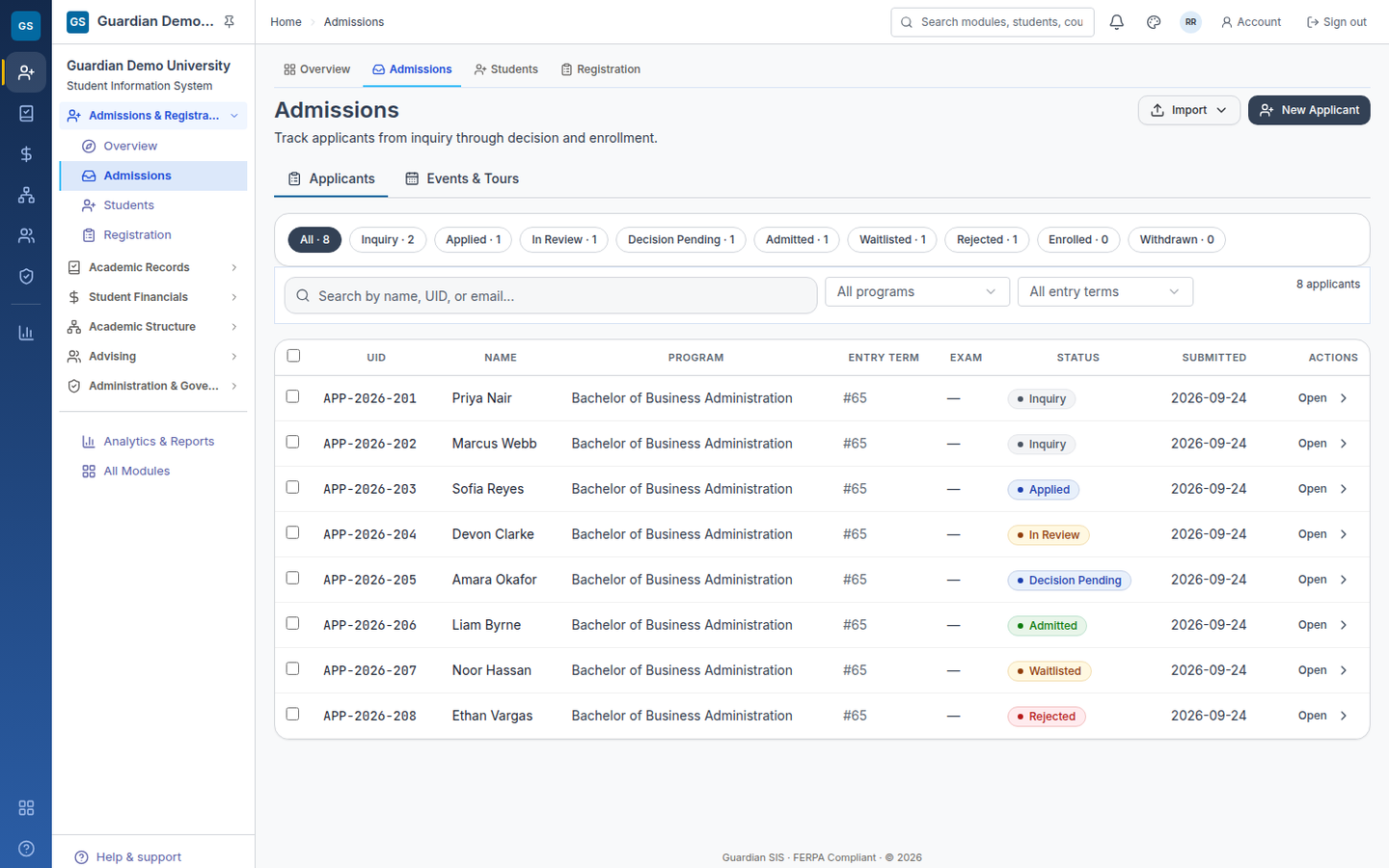
Everything described below is in the product, and the screenshots on this page are real captures of it — no mockups, no concept art. Request access and we will configure a tenant for your institution, with your name on it, and hand it over.
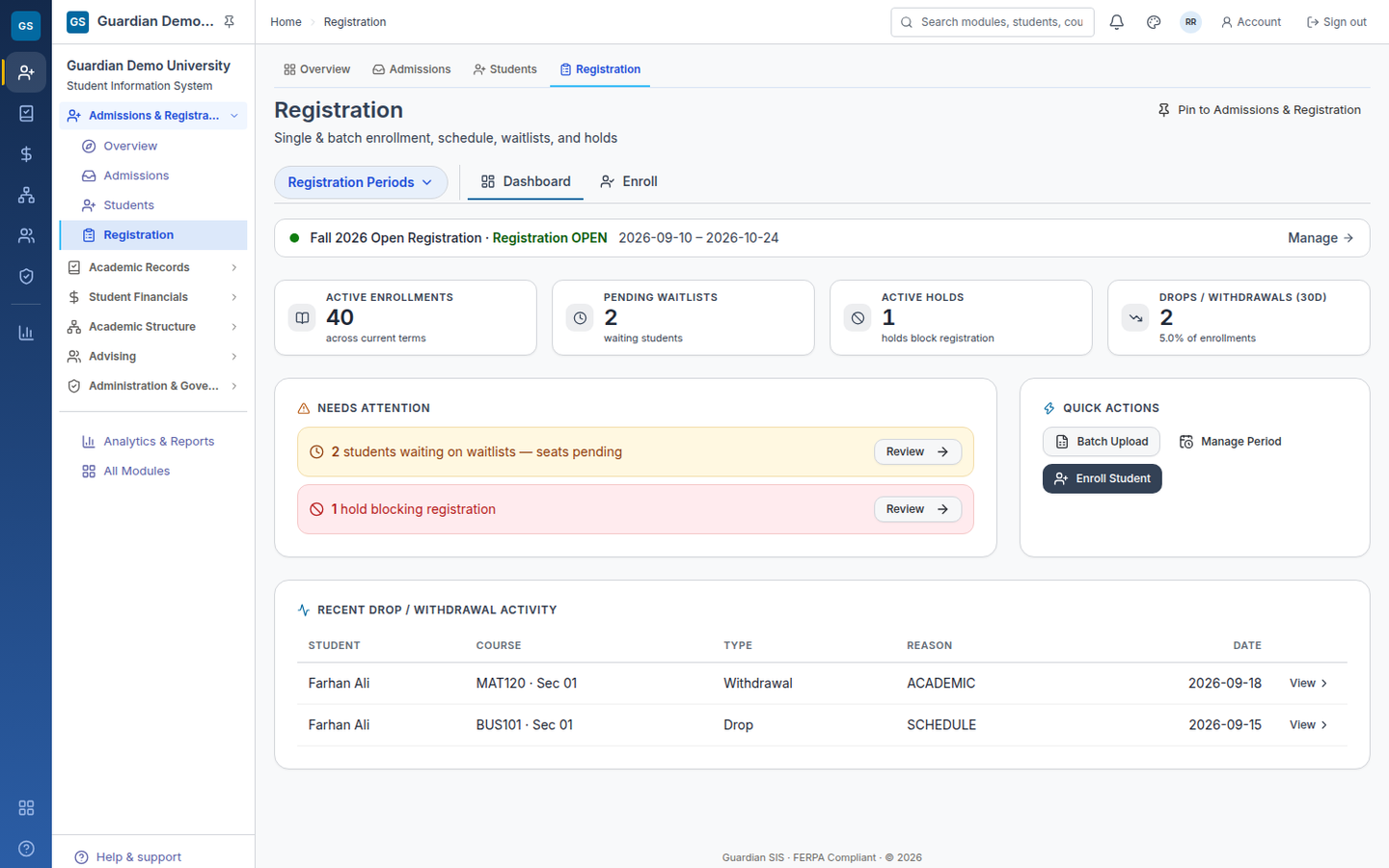
Admissions & Registration
Applicants in, students registered, waitlists and holds respected.
- Online applications with save-and-resume and conditional fields
- Decision letters and applicant deposits handled in the system that already owns the record
- Registration that respects capacity, prerequisites and holds, with waitlists that release in order
- The applicant becomes a student without an export, an import or a re-key
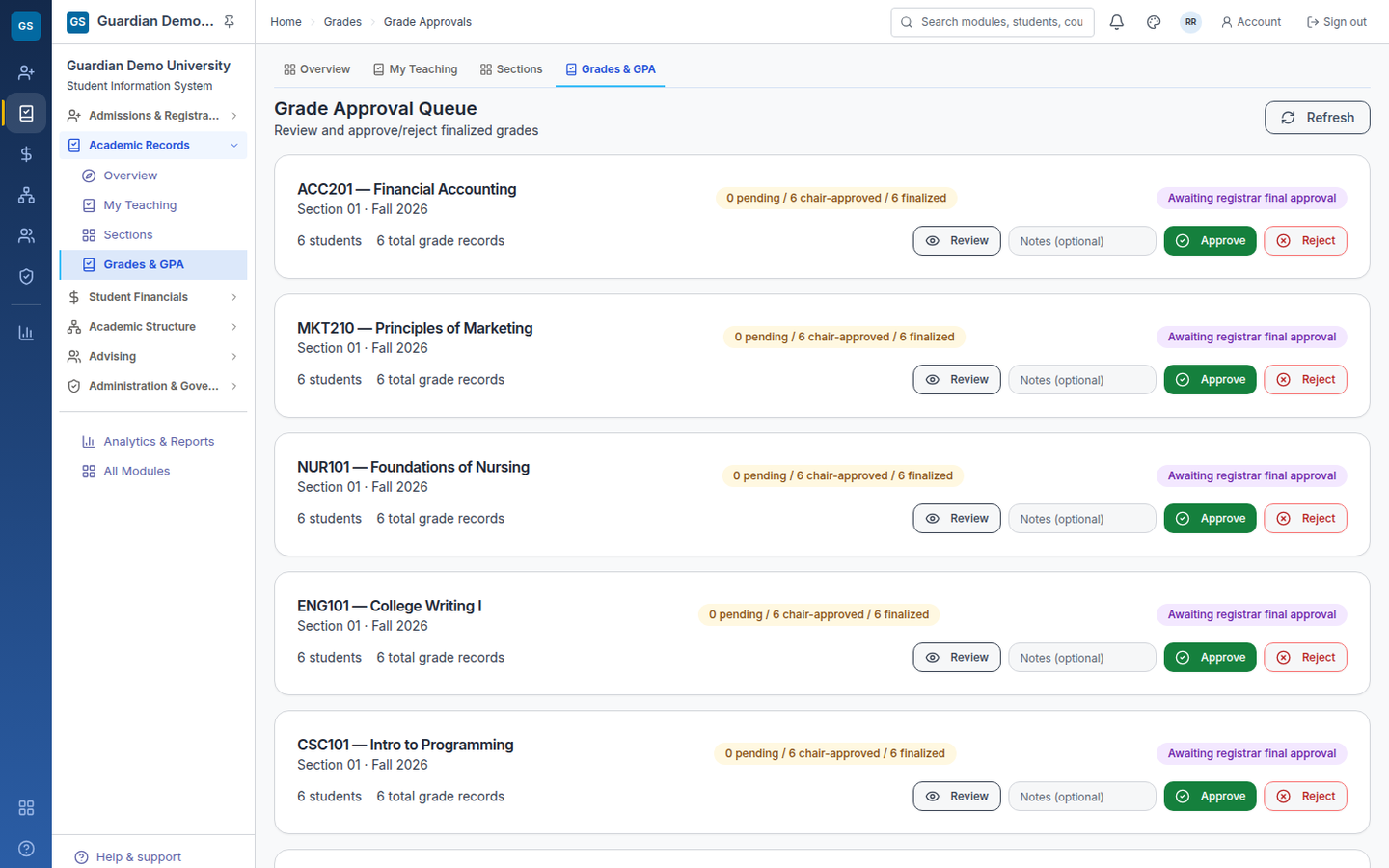
Academic Records
Grades, transcripts and degree progress that survive a challenge.
- Grade entry with an approval step, so a grade is proposed or approved — never quietly changed
- Sealed PDF transcripts with public verification codes, issued from the office
- GPA and academic standing computed from approved grades only
- Degree progress and what-if planning, per student
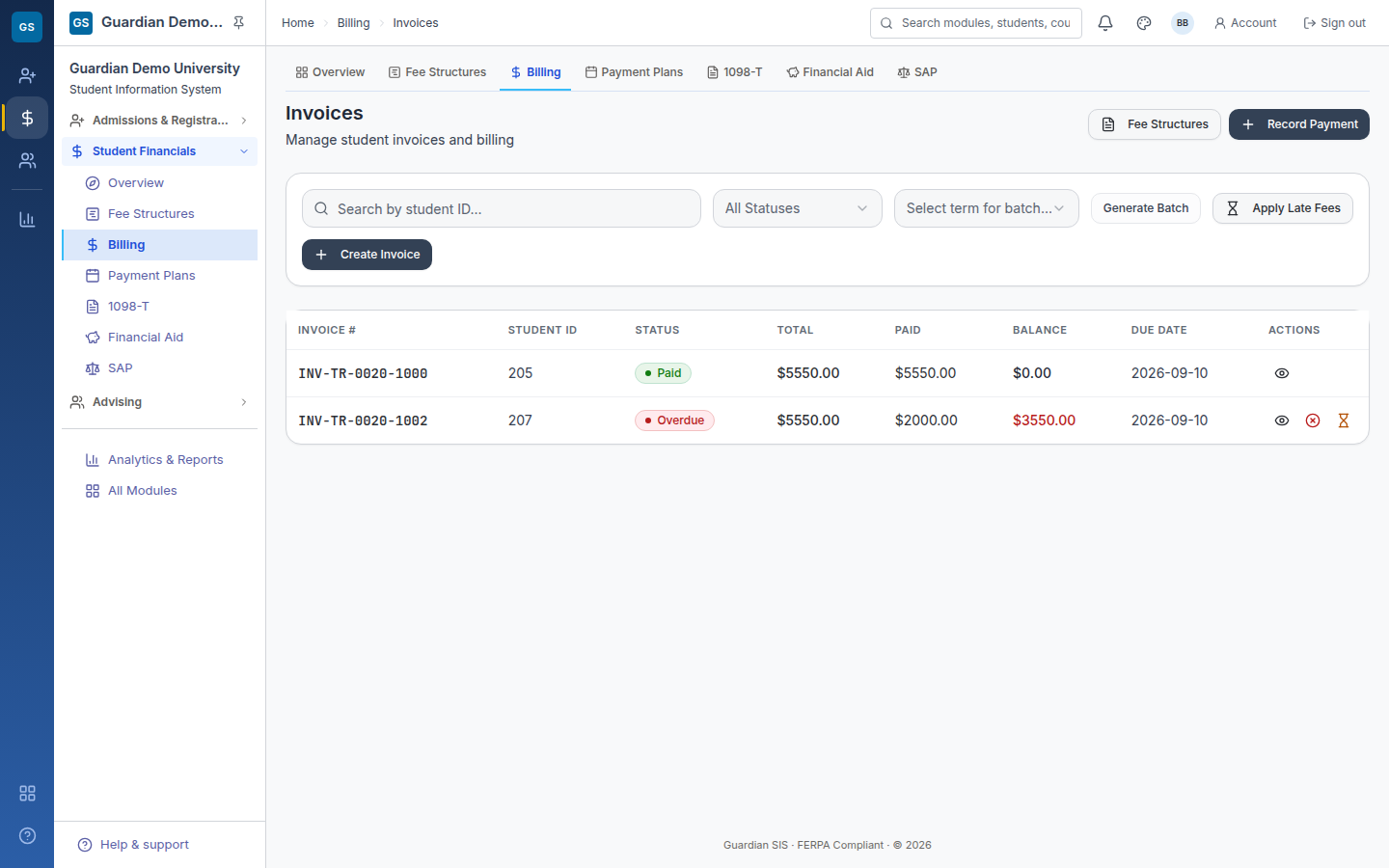
Student Financials
The Bursar and the aid office looking at the same student.
- Invoices, payment plans, refunds and late fees
- Financial aid: award types, packaging, SAP and R2T4
- 1098-T readiness from the same ledger the student sees
- One balance — not a bursar's spreadsheet and an aid office's export
The other three journeys
Academic Structure
Programs, courses, catalog, terms, departments and grade scales — one canonical home per object.
Reachable in the demoAdvising & Alumni
Advising notes and degree progress for current students; alumni records that continue the same record.
Reachable in the demoGovernance & Reporting
Configuration, roles and permissions, audit reporting, IPEDS and institutional reporting.
Reachable in the demoSecurity & student-data protection
FERPA-aware, tenant-isolated, and provable.
Security claims are cheap on a landing page, so here is what we can demonstrate rather than assert — described as it behaves in the demo environment.
FERPA-aware by design
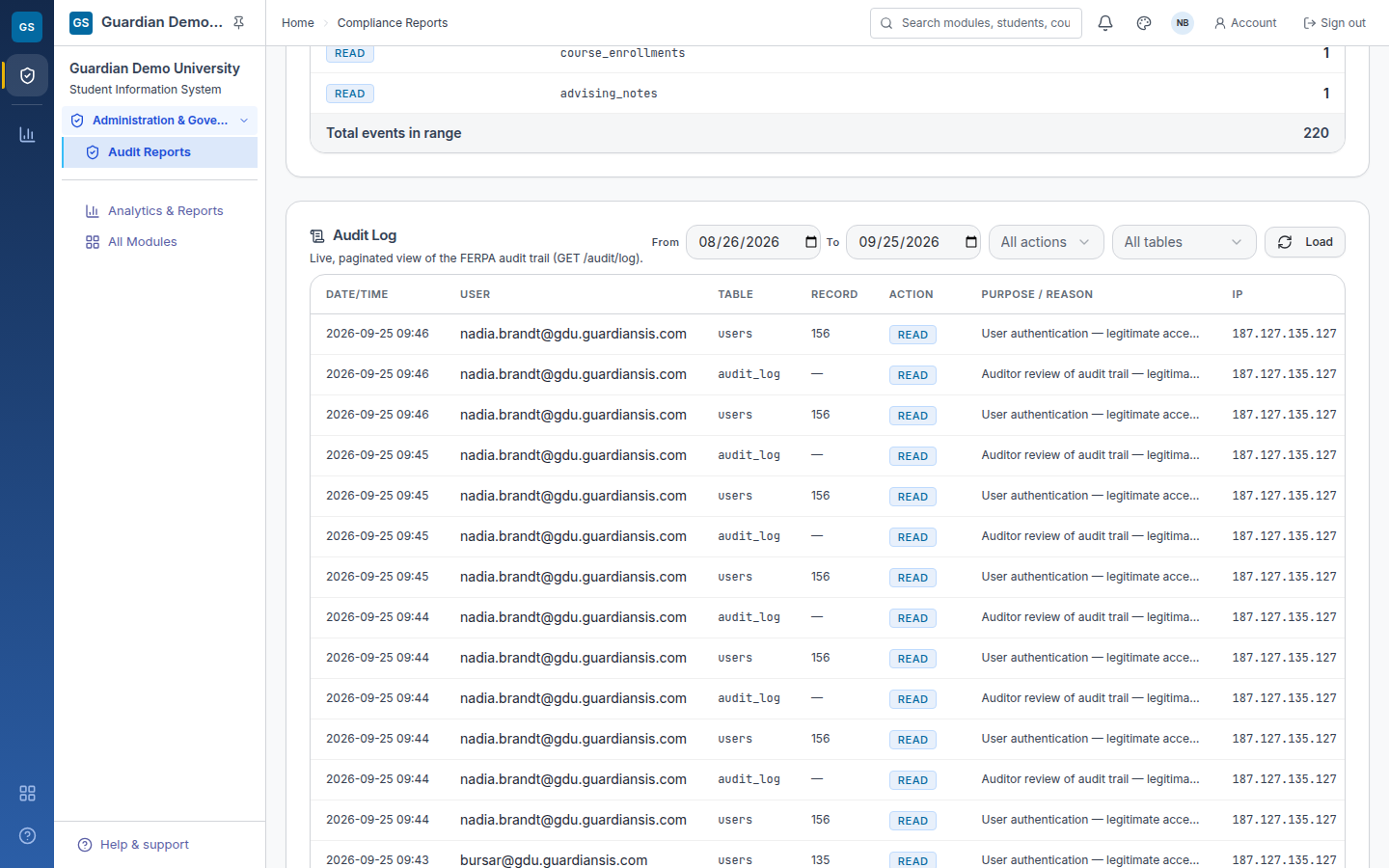
A role-based permission matrix decides what each role may see and do, and every access to student data
records the purpose it was made for (purpose_reason). Student data is not “anything with a
login can look”, and the reason for looking is part of the record.
The tenant wall is in the database
Institutions are separated by PostgreSQL row-level security: every tenant table carries
ENABLE + FORCE row-level security under one uniform isolation policy, so the policy binds the
application's own database role rather than being silently bypassed by the owner. It fails closed: a
session with no institution scope reads zero rows. We verify it by trying — a cross-tenant read returns
0 rows in both directions.
Second factor, and your identity provider
Login can require a TOTP authenticator-app code, with single-use recovery codes and per-IP rate limiting on verification. Sign-in can also run through your college's own identity provider, over OpenID Connect or SAML 2.0, so staff use the credentials they already have.
An audit trail that can't be quietly edited
Audit entries are appended, never updated in place, and the chain is kept per institution. A deleted user leaves a tombstone rather than a hole, so a term's history still reconciles after staff move on.
What an auditor actually asks for
Who looked at this student's record, when, and why. In Guardian SIS that is one query against one log: the actor, the action, the record, and the purpose that was recorded at the time of access. It is the screen we most want a Registrar and an auditor to see in the demo.
How access works
A tenant is configured for your institution, not handed to you as a shared sandbox. Three steps.
01
You request it.
One short form. We ask who you are, which institution, and how many learners you enrol, because the tenant we build is configured for your college.
02
We set it up and hand it over.
Your own tenant, your own sign-in, your institution's name on it. A real system with your data model, not a sandbox you poke at.
03
Your 30 days start when access reaches you.
Not when you ask. The clock starts the day the tenant is handed over, so every day of the trial is a day you can actually use.
Where we stand
Pre-pilot, and honest about it.
No college runs its records on Guardian SIS in production today. We have no customers to name and no logos to borrow, so we show you a working product instead of a wall of references. If you are weighing us against a vendor who can produce ten college references, you are weighing different things — and you should know exactly which.
What you can verify today
- A tenant of your own — populated, configured for your institution, handed over with access
- The test suite, counted on this page at build time
- The FERPA architecture: one permission matrix, purpose-logged access, append-only audit
- The tenant wall, with a cross-tenant read attempted as the negative test
What we do not have yet
- Production customers, or reference calls with them
- SOC 2 or ISO 27001 — we hold no certifications and badge none
- Case studies, or a multi-year track record
- A completed production rollout of the tenant wall
What a founding pilot is
- Your data migrated with our team, not a partner's
- Direct access to the people building the product
- Roadmap input where it changes how your term runs
- Commercials scoped per institution, agreed on a call
How an evaluation actually runs
01
Request access
Tell us who you are and which institution you run. We configure a tenant for your college and hand it over — your sign-in, your institution's name on it.
02
A 30-minute walkthrough on your workflows
On your tenant, with your committee: registrar views, bursar views, aid, transcripts. Bring your own questions and your worst spreadsheet.
03
Pilot terms, scoped for your institution
What goes live first, how the data migration runs, and what it costs for your institution — agreed with you, on a call.
Questions your committee will ask
Straight answers, including the awkward ones.
The product is built and running: six journeys, 38 documented screens, a populated demo tenant, a tenant wall, and a test suite whose size is computed on this page at build time. What it does not have is a college's live term behind it yet — the founding pilot exists to close that gap, with our team doing the migration beside you.
Designed to go live in weeks, not a multi-quarter project with consultants. Guardian SIS is a self-serve, multi-tenant service: there is no on-premise install and no third-party integrator in the path. In the pilot, our own team runs the data migration with you and hands over a working institution — and the first term is the real test, not a slide.
Yes — structured imports accept CSV and Excel exports, which is what most legacy student systems and every spreadsheet produce. Migration is part of pilot onboarding, not a change order. The honest version: bring your actual exports to the walkthrough and we will map them in front of you, so you see the messy cases before you commit rather than after.
An LMS connection covers Canvas, Moodle, Blackboard and OneRoster; transcript export is a PESC/SPEEDE-style XML extract — an export, not a vendor-cleared integration, and we would rather say that plainly than imply a certificate we do not hold. Communications and automated processes are built in. Specific integration questions are walkthrough material, not brochure material.
We say FERPA-aware by design rather than “FERPA certified”, because there is no such
certification to hold. Concretely: a role-based permission matrix decides access, every access to
student data records its purpose (purpose_reason), the audit log is append-only and
hash-chained per institution, and institutions are separated by PostgreSQL row-level security that
fails closed. Your data sits in its own tenant, not in a shared table that everyone reads.
No. We hold no certifications and we badge none. What exists today is the engineering those audits are built on top of: a single permission matrix, purpose-logged access, an append-only hash-chained audit trail, row-level tenant isolation, second-factor login and SSO. A CIO should treat “no certification yet” as a fact to plan around — and it is one of the things a pilot is meant to change.
Commercials are scoped per institution and discussed on a call. There are no rates, tiers or per-student prices on this page — deliberately, because what you switch on, how many learners you carry and how much migration is involved all move the number, and a published figure would be wrong for most readers. Ask on the walkthrough and you will get a figure for your institution, in writing.
Because the handover between them is where the work and the risk live. In a two-vendor setup the admission record is exported into the student system, permissions are reconciled twice, and the audit trail stops at the boundary. Here the applicant, the student and the alumnus are the same record in the same database: recruitment activity, grades, invoices and aid sit on one row with one permission model and one log. It is also one contract and one renewal instead of two — and one vendor to hold accountable when the record is wrong.
Request a demo
Book a 30-minute walkthrough.
Registrar views, bursar views, aid, transcripts, the audit log — on your tenant, on the workflows you actually run. No slide deck, no script, and no obligation to be impressed.
Commercials are scoped per institution and discussed on the call. This page publishes no prices, tiers or per-student rates, because a figure that fits every institution fits none of them.
Nothing was sent — so this form will not say it was.
The demo-request endpoint could not be reached from this page. Your details are not lost: send them from your own mail client, with the message already written for you.
transport: not reachable from this origin · see DESIGN-NOTES.md → Form transport
Request received.
Thank you — a person from the product team will reply within one business day. We configure a tenant for your institution and hand it over; your 30 days start the day access reaches you.